Quick Start Guide
Visual instructions for LAC/RAC configuration.
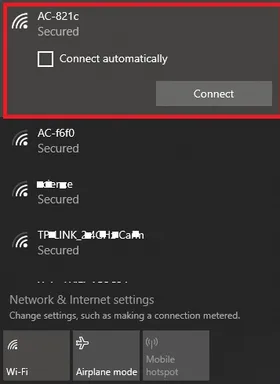
Description:Scan for WiFi on your smart device.
Required Action:Click connect to the AC-**** device.
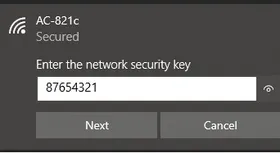
Description:Click connect and enter the password.
Required Action:87654321 then click connect.
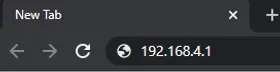
Description:Open a web browser (Chrome, Safari, Explorer).
Required Action:Type the IP address 192.168.4.1 in the browser; hit enter.
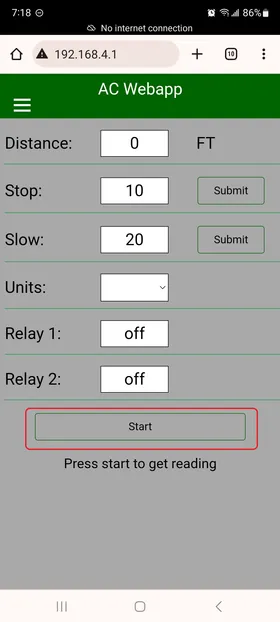
Description:The home page will load. You can now enter your setpoints.
Required Action:Verify the dashboard matches the image shown.
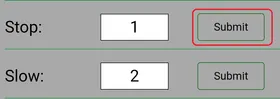
Description:Enter your new slow and stop setpoints.
Required Action:Click submit to update the system.
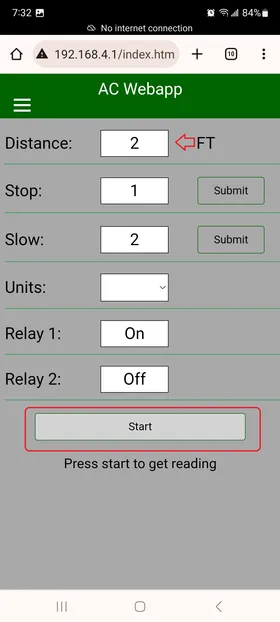
Description:Press start to see your live distances.
Required Action:You should see your live readings and updated setpoints.
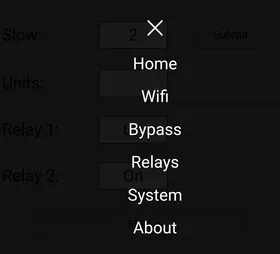
Description:Open the Nav menu in the top left to see the menus.
Required Action:Proceed to WiFi menu to rename your WiFi.
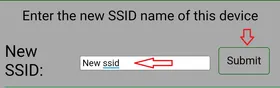
Description:Go to the WiFi New SSID box.
Required Action:Rename your WiFi so you can identify this crane.